How to Calculate Pie Chart Percentages and Angles
In this article
Percentage formula
To find a slice’s percentage, divide its value by the total of all values and multiply by 100.
Percentage = (value ÷ total) × 100
Angle formula
A full circle has 360°. To find a slice’s angle, multiply its share of the total by 360.
Angle = (value ÷ total) × 360°
Worked example
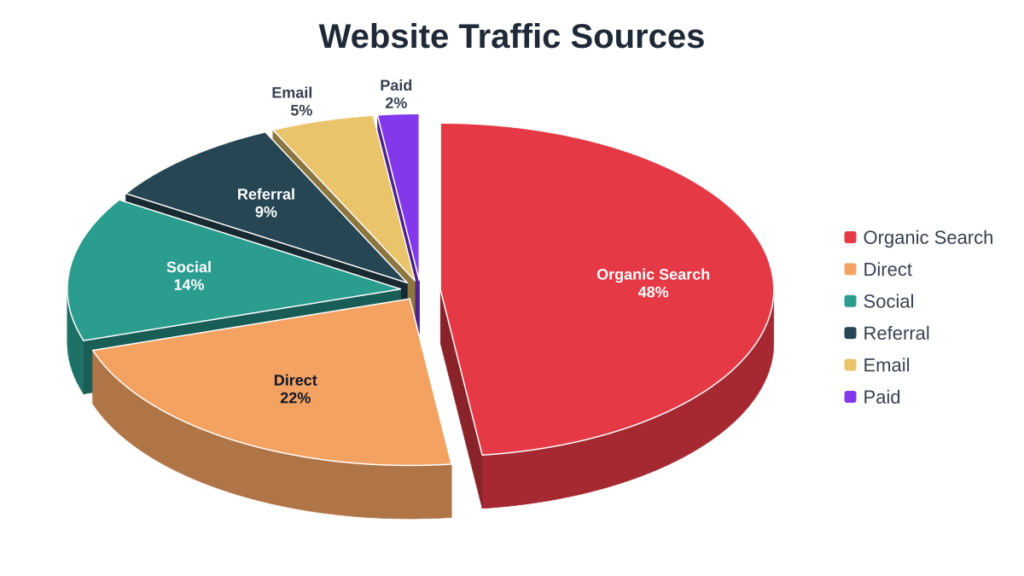
Suppose a website gets 1,000 visits: 480 from search, 220 direct, 140 social, 90 referral and 70 email.
| Source | Visits | Percentage | Angle |
|---|---|---|---|
| Search | 480 | 48% | 172.8° |
| Direct | 220 | 22% | 79.2° |
| Social | 140 | 14% | 50.4° |
| Referral | 90 | 9% | 32.4° |
| 70 | 7% | 25.2° |
The percentages add up to 100% and the angles add up to 360°. You do not need to calculate any of this by hand: enter the visit counts into the pie chart maker and choose “Percentage” as the slice text.
New to pie charts? Read what a pie chart is.
Try it yourself. Create your own chart with the free pie chart generator . no sign-up needed.